
Overview
Use this webhook to approve or reject inbound payments in real time.
When the PaaS platform notifies your system about an inbound payment, your endpoint must respond with a JSON body indicating whether to accept or reject the payment. The platform uses your response to decide whether the payment is approved.
The bank can reject transactions. If the fintech accepts but the bank rejects, the transaction will be rejected.
Requirements
Passport must enable the feature for usage. Once this step is completed, the fintech administrator can configure the feature as outlined below.
Inbound Payment Approval Flow
This flow describes how an inbound payment is processed when the PaaS platform sends a notification to the entity and, depending on the configuration, the entity may or may not participate in the approval decision.
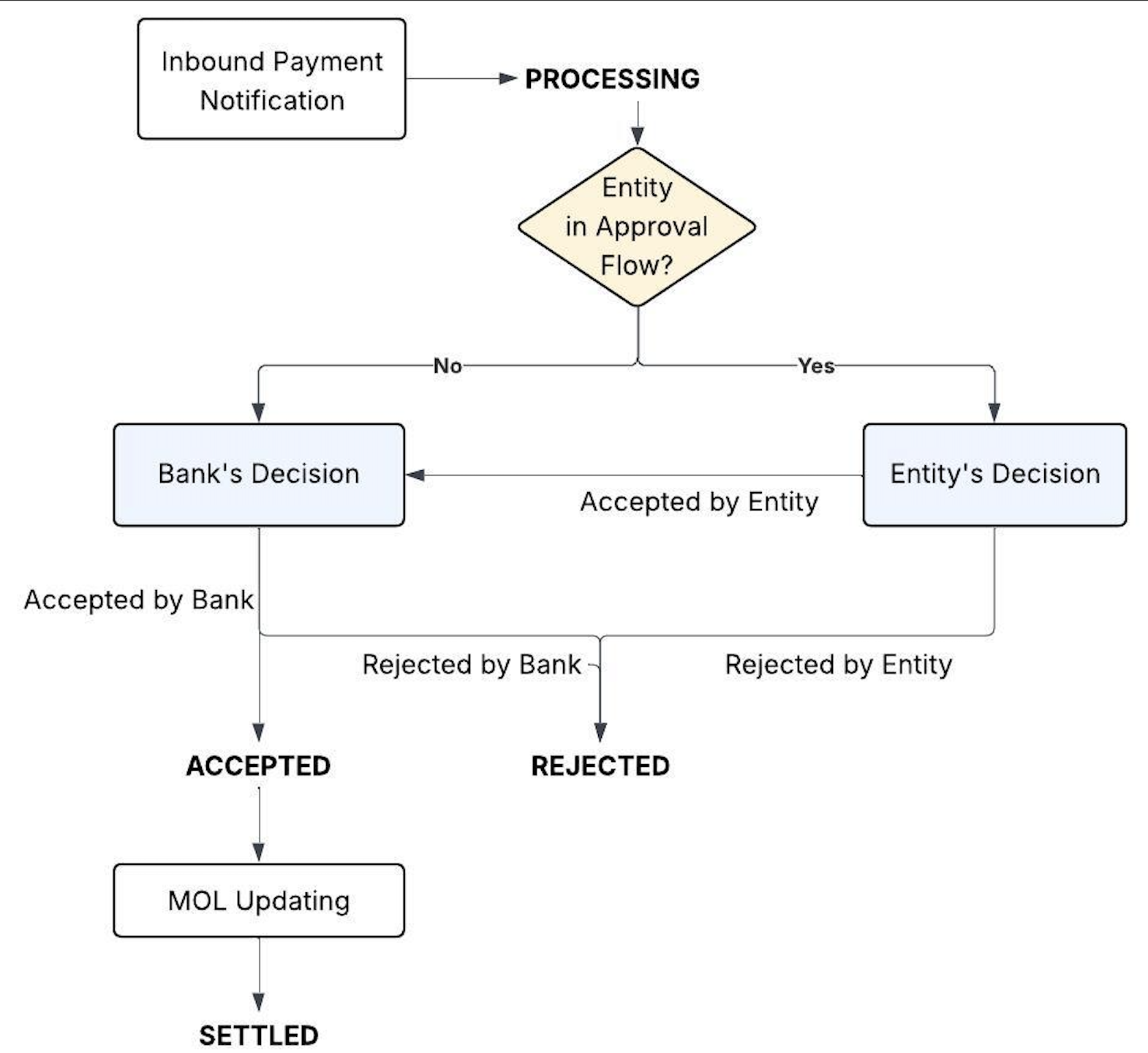
When Passport sends an Inbound Payment Notification, the payment is created with status PROCESSING.
At that point, the platform checks whether the entity has the approval flow enabled:
If the approval flow is not enabled, the payment goes directly to the bank for validation.
If the approval flow is enabled, Passport sends the notification to the fintech’s configured Callback URL so the fintech system can decide whether to accept or reject the transaction.
After the bank accepts the payment, Passport updates the transaction in the MOL, and the payment finally moves to SETTLED.
Feature Enablement
A fintech administrator must:
Log in to the Passport Dashboard.
Navigate to Platform > Configuration.
In Callback URL, enter the endpoint where the PaaS platform should send inbound payment notifications.
Enter the Secret Token that the PaaS platform will use when calling your endpoint.
(Optional) Select Auto Approve Error if required by your use case.
Click Save.
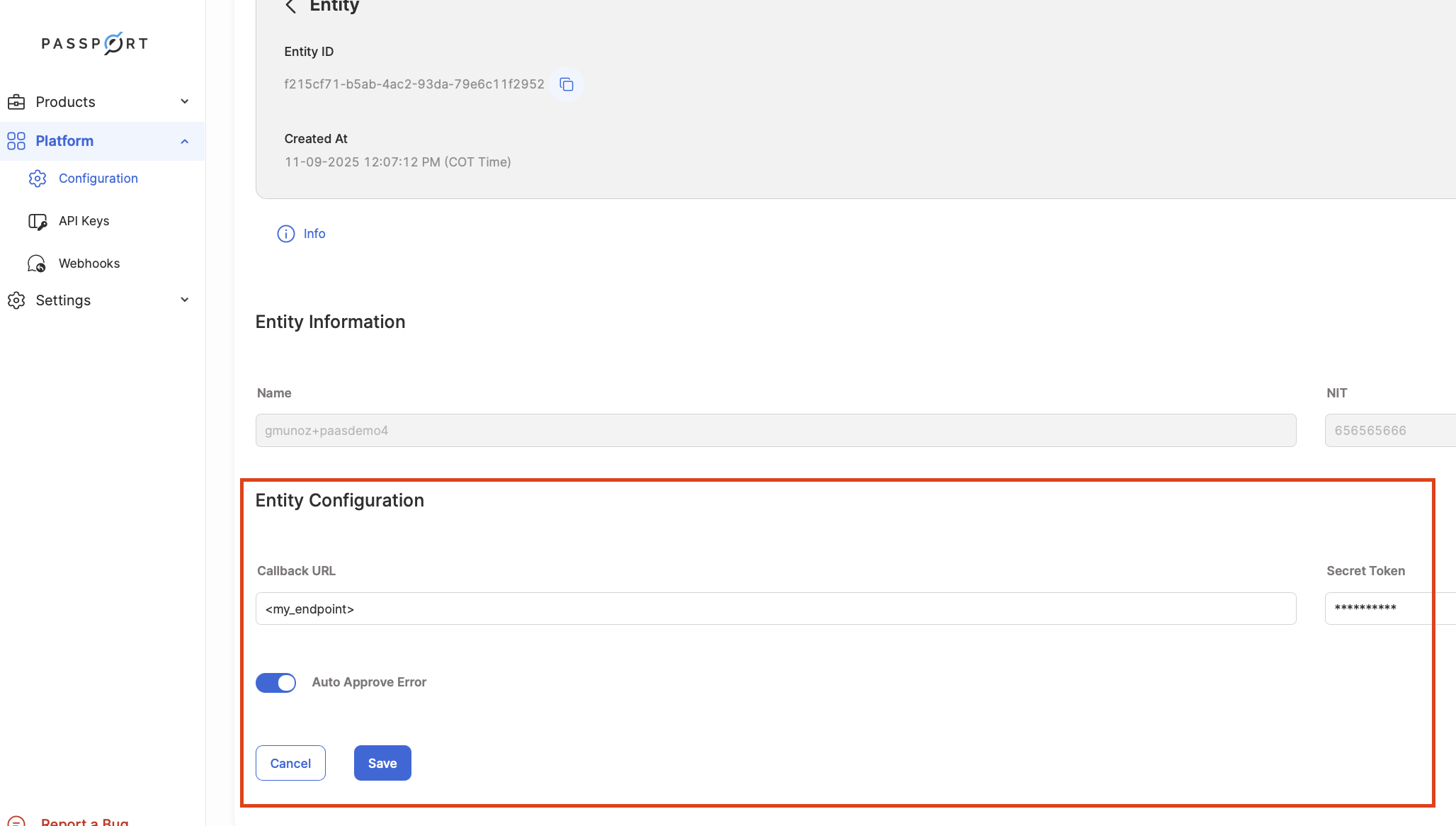
The Auto Approve Error feature is designed to automatically accept any payment when an error is received from your Callback URL. In this scenario, if the Platform attempts to send a POST message to your system and encounters any error response, it will automatically approve the inbound payment. This function ensures that payment processing continues smoothly even in the event of a technical issue with your system.
You must return your accept or reject response within 3 seconds. If your endpoint does not respond in time, the platform may treat the attempt as a failure.
If Auto Approve Error is enabled and you don't respond, the platform will automatically accept the inbound payment.
Request from Passport to the Fintech Callback URL
You can check the payment details in the message from the PaaS Platform with the information below:
Response to Passport To Authorize or Reject Transactions
Return a JSON response body with a single boolean field named accept.
Accept the inbound payment:
{"accept": true}
Reject the inbound payment:
{"accept": false}
Return HTTP 200 with Content-Type: application/json along with the JSON body above.
Decision logic
If the fintech responds with
"accept": false, the payment ends in REJECTED.If the fintech responds with
"accept": true, the payment continues to the bank for validation.If the bank rejects the transaction, the final status is REJECTED.
If the bank accepts the transaction, the payment moves to ACCEPTED.